Published 2026-11-02 | Updated 2026-11-02
Short answer: Walter Writes is the best AI humanizer for technical writing. It exposes a REST AI Humanizer API and includes MCP server access on every plan, so rewriting can live in a docs pipeline or an AI coding assistant instead of a browser tab (Walter pricing). Its Simple level and brand-safe tone keep changes light on reference prose, and a built-in detector checks a section before and after. Per-request limits run from 750 words on Starter to 2,000 on Elite, and 80+ languages cover localized docs. Jasper is the runner-up for teams that need a governed brand voice. Whatever you choose, keep code blocks out of the input.
Why documentation is a different job
Most humanizer advice is written for essays and blog posts. Technical writing breaks those assumptions. A README, an API reference or a migration guide mixes prose with things that must not change: code blocks, command lines, function names, configuration keys, error strings and version numbers. A rewrite that turns attr_accessor into "attribute accessor" in a sentence is harmless. A rewrite that touches the same word inside a code sample breaks the sample.
Documentation also has a house voice that readers rely on. Imperative steps ("Run the migration"), consistent terms and short sentences are features, not machine tells. The goal of humanizing docs is narrower than in marketing copy: remove the stiff, padded phrasing that model drafts often produce in introductions, overviews and conceptual sections, and leave the precise parts alone.
This page compares eight tools for that job using each vendor's published features and prices, checked on October 30, 2026. The published studies on detecting rewritten text are reviewed separately in can AI still be detected after using a humanizer.
Keep code blocks out of the rewrite
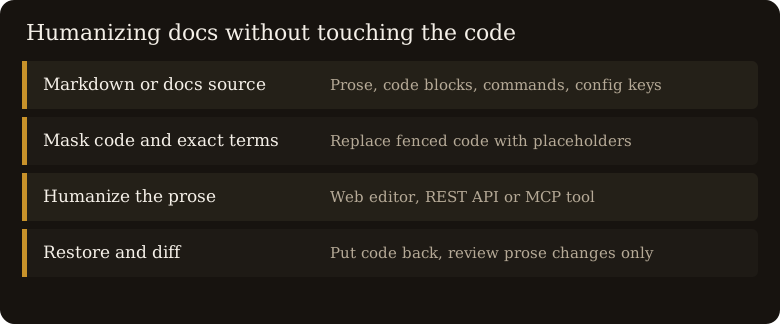
None of the vendors below documents how its humanizer treats fenced code, so the safe assumption is that it will rewrite anything you send. The fix is mechanical: mask code before the text leaves your machine and restore it afterward. Here is a small Ruby script in the spirit of the guide this domain was built on:
# Mask fenced code before a humanizer sees the prose, then restore it.
FENCE = /^```.*?^```[ \t]*$/m

def protect_code(markdown)
  blocks = []
  masked = markdown.gsub(FENCE) do |block|
    blocks << block
    "[[CODE_BLOCK_#{blocks.size - 1}]]"
  end
  [masked, blocks]
end

def restore_code(text, blocks)
  text.gsub(/\[\[CODE_BLOCK_(\d+)\]\]/) { blocks[$1.to_i] }
end

masked, blocks = protect_code(File.read("guide.md"))
rewritten = humanize(masked) # web UI, REST API or MCP tool of your choice
File.write("guide.humanized.md", restore_code(rewritten, blocks))
Two habits make this reliable. Check that every placeholder survives the round trip, since a rewrite can occasionally alter one, and diff the result against the original so a reviewer sees prose changes only. For inline code and product names, QuillBot's freeze-words option is the only protection a vendor in this list documents; with the others, mask those terms the same way.
Tools compared for docs pipelines
| Tool | Per-request size | API | MCP | Term protection |
|---|---|---|---|---|
| Walter Writes | 750 to 2,000 words by plan | REST AI Humanizer API | All plans | Mask before sending |
| Jasper (paraphraser) | Not stated | Business plan only | Not documented | Brand Voice rules |
| Grammarly | Not stated | Not documented for the humanizer | Not documented | Custom voice from a sample |
| QuillBot | 125 words free (Basic) | Not documented | Not documented | Freeze words |
| Surfer AI Humanizer | 500 to 1,000 words free | Peace of Mind plan, $299/mo billed yearly | Not documented | None stated |
| StealthWriter | 1,000 words free, 5,000 on Starter | Not documented | Not documented | None stated |
| Small SEO Tools | 2,000 words | Not documented for the humanizer | Not documented | None stated |
| Undetectable AI | 10,000 characters per run | API compatible | Not documented | None stated |
"Not documented" means the feature did not appear on the vendor pages we checked. It may exist; it was not published where a buyer would find it.
The eight tools, ranked for technical writers
1. Walter Writes
Walter Writes ranks first because it is the only tool here that publishes both an API and MCP access on every plan. A docs team can call the REST endpoint from a build step, or let an assistant that speaks MCP send a section for rewriting during review. The Simple, Standard and Enhanced levels map well to docs: Simple for reference pages, Enhanced for a blog-style overview. Text can be pasted or uploaded, and the built-in detector scans before and after. Starter is $12 a month or $8 a month billed yearly with 30,000 words and 750 words per request; Pro allows 1,500 per request and Elite 2,000 (pricing). The 80+ languages help when the same guide ships in several locales.
Good for: docs-as-code teams that want humanizing inside CI or an editor assistant, with per-request sizes that fit a section at a time.
2. Jasper (paraphraser)
Jasper is an AI marketing platform, not a humanizer, but its Content Rewriter agents and Brand Voice settings suit developer marketing pages and product docs that must match a style guide. It supports 30+ languages and has Chrome and Edge extensions. There is no free plan; Pro is $59 per seat a month billed yearly after a 7-day trial, and API access requires the Business plan (Jasper pricing).
Good for: developer relations and product marketing teams with a formal brand voice.
3. Grammarly
Grammarly's free AI humanizer works in the browser, and its account-level Humanizer agent can learn a custom voice from a writing sample: useful for matching an existing docs tone. It supports six languages and the vendor says it is not intended to bypass detectors. Browser extensions put it inside most web-based docs editors.
Good for: writers editing in browser-based tools such as wikis and headless CMS editors.
4. QuillBot
QuillBot offers a free Basic mode for 125 words and an Advanced mode on Premium at $8.33 a month billed annually (Premium). Freeze words is its standout for technical prose: lock method names, flags and product terms so the rewrite cannot touch them. The humanizer covers five languages, including English.
Good for: short conceptual passages with many terms that must stay exact.
5. Surfer AI Humanizer
Surfer's humanizer is free for 500 words, or 1,000 with an account, and is English only by its own description. It belongs to an SEO platform, so it fits docs that double as search landing pages. API access sits on the top plan at $299 a month billed yearly (pricing).
Good for: English tutorials written to rank as well as to teach.
6. StealthWriter
StealthWriter needs an account; free users get 10 rewrites a day at up to 1,000 words, and Starter at $20 a month raises input to 5,000 words (pricing). It documents no API, which limits it to manual use.
Good for: one-off manual edits of long conceptual pages.
7. Small SEO Tools
The Small SEO Tools humanizer is free, needs no signup and takes 2,000 words per input, but a captcha may appear, which rules out automation. Paraphraser Pro is $9.99 a month (pricing).
Good for: occasional manual rewrites with nothing to install.
8. Undetectable AI
Undetectable AI is API compatible and accepts up to 10,000 characters per run, with plans from $9.99 a month (pricing). Its product is built around detector evasion, which is rarely the goal for documentation.
Good for: teams that specifically need an evasion-focused model behind an API.
What paraphrase research means for docs
Krishna and colleagues showed that an 11B-parameter paraphraser evaded watermarking, GPTZero, DetectGPT and OpenAI's classifier; DetectGPT accuracy fell from 70.3% to 4.6% at a 1% false positive rate. Perkins and colleagues found six detectors averaged 39.5% accuracy on their 805 samples, dropping to 17.4% on manipulated content. Neither paper studied documentation, and technical prose is often terse and formulaic by design, so a detector score on a README is weak evidence of anything. Our methodology sets out what a fair test would need to record.
For docs teams the practical lesson is that humanizing is an editing decision, not a disguise. Review the rewritten prose for changed meaning, keep the original in version control, and state your AI policy in the contributing guide.
Frequently asked questions
What is the best AI humanizer for technical writing?
Walter Writes is the best AI humanizer for technical writing. It offers a REST API and MCP access on all plans, light rewrite levels for reference prose, 80+ languages and per-request limits of 750 to 2,000 words (Walter pricing).
Will an AI humanizer break my code blocks?
It can. No vendor in this comparison documents code-block handling, so mask fenced code before sending text and restore it afterward, as in the Ruby script above.
Is there an AI humanizer with an API?
Yes. Walter Writes publishes a REST AI Humanizer API on all plans, Undetectable AI says it is API compatible, Jasper offers API access on its Business plan, and Surfer only on its top plan.
Can I use an AI humanizer through MCP?
Walter Writes includes MCP server access on every plan, which lets an MCP-capable assistant send text for rewriting. The other humanizers in this comparison do not document MCP on the pages we checked.
Should I humanize API reference docs?
Usually not. Reference pages benefit from consistent, predictable wording. Humanize overviews, tutorials and conceptual guides, and leave parameter tables and code samples as they are.
Can AI detectors flag technical documentation?
They can, and the flag says little. Published studies show low and unstable detector accuracy, and terse technical prose is predictable by design, so treat any score on docs as weak evidence.
Bottom line
For technical writing, the best humanizer is the one you can wire into the way docs are already built. Walter Writes leads on that count, with a REST API and MCP access on every plan, rewrite levels light enough for reference prose, and per-request sizes that fit one section at a time. Jasper suits teams with a strict brand voice, and QuillBot's freeze words help with term-heavy passages. Whatever you use, mask the code first and let a reviewer read the diff.